
What is RAID? What is the real difference between RAID 0, RAID 1, RAID 5, and RAID 10? And should you use software RAID or a hardware controller? This guide answers all of it in plain language, so you can pick the right setup for your server without wading through jargon.
What Is RAID?
RAID stands for Redundant Array of Independent Disks. It is a way of combining two or more physical drives into one logical volume so that your server gains speed, protection against drive failure, or both.
RAID protects two different things, and it helps to keep them apart: your data (a failed drive does not erase it) and your uptime (the server keeps running while the failed drive is replaced).
With the right RAID level, an entire drive can die and your server keeps serving as if nothing happened. The failed drive gets swapped, the array rebuilds, and your visitors never notice.
One thing RAID is not: a backup. RAID survives a drive failure. It does not survive accidental deletion, ransomware, file corruption, or a software bug, because every one of those is faithfully written to all drives in the array. Keep real backups in a different location no matter which RAID level you run.
Do I Need RAID?
Hard drives fail. It is not a risk, it is a schedule: run enough drives for long enough and failures are a certainty.
When a drive fails on a server without RAID, you get downtime and data loss at the same time, and recovery means rebuilding the server from backups.
When a drive fails on a redundant array (RAID 1, 5, or 10), the server keeps running and you replace the drive at your convenience.
If your server earns money or holds anything you would miss, you want redundancy, and possibly the performance boost that comes with it. The only real question is which level fits your workload.
The RAID Levels, Side by Side
We will start with the summary, then walk through each level.
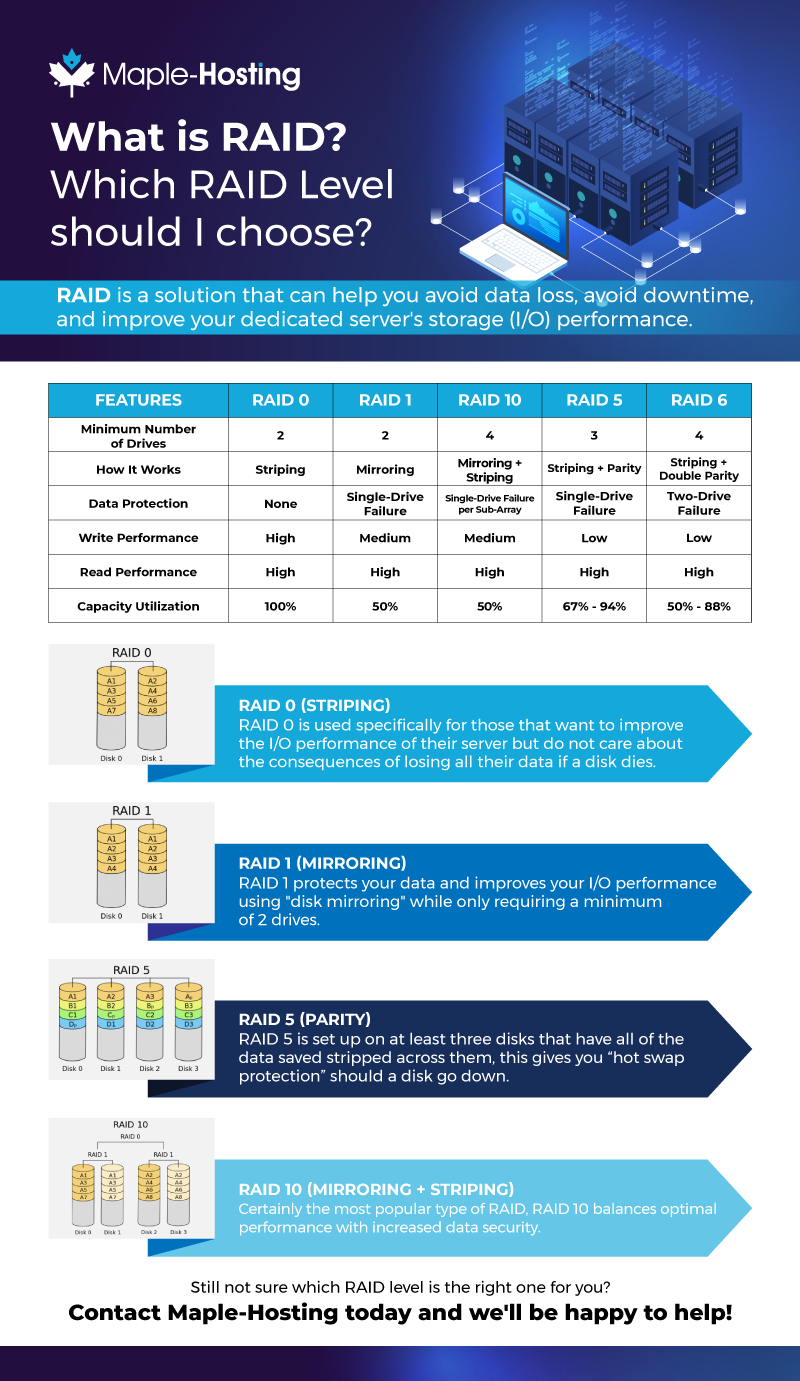
| Level | Min. drives | Usable capacity | Survives | Best for |
|---|---|---|---|---|
| RAID 0 | 2 | 100% | Nothing: one failed drive loses everything | Scratch space and reproducible data where speed is all that matters |
| RAID 1 | 2 | 50% | All but one drive in the mirror | Critical data on a 2-drive server |
| RAID 5 | 3 | (n−1)/n | One failed drive | Read-heavy archives where capacity matters most |
| RAID 10 | 4 | 50% | One drive per mirrored pair | Databases and busy servers that need speed and safety |
RAID 0 (Striping)
RAID 0 is pure performance. Data is split into segments and spread (striped) across all drives, so reads and writes happen on every drive at once.
There is no redundancy at all: if any one drive fails, the whole array and all data on it are gone.
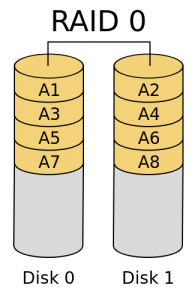
In the illustration, each block of data lives on exactly one drive. That is why the speed doubles and the risk doubles with it: two drives means two points of total failure.
Use RAID 0 only for data you can regenerate without pain: caches, build artifacts, temporary processing space. Never for the only copy of anything.
RAID 1 (Mirroring)
RAID 1 writes identical data to every drive in the mirror, most commonly two. Each drive holds a complete copy of everything.
With RAID 1 you always have at least two full copies of your data. If a drive fails, the surviving drive simply carries on, and the server with it.
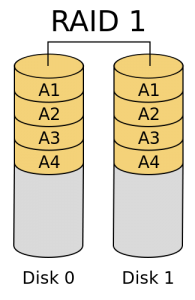
Reads can be served from both drives at once, so read performance improves, up to roughly double with two drives. Writes run at the speed of a single drive, since every write goes to all of them.
RAID 1 is the sensible default for a 2-bay server: half the raw capacity, in exchange for the simplest and most robust redundancy there is.
RAID 5 (Striping with Parity)
RAID 5 stripes data across three or more drives and adds parity information, spread across all of them. The array survives one failed drive: the missing data is recomputed from parity while you swap the drive in.
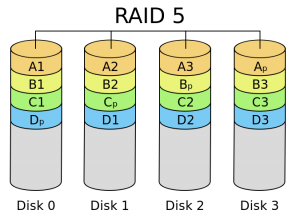
Capacity is the selling point: you lose only one drive’s worth to parity, so four 4 TB drives give you 12 TB usable. Reads are fast thanks to striping. Writes pay a parity penalty, because every write also updates parity.
How Does Parity Work?
Here is a simplified example of how parity works.
Data in computers is represented by bits, each either 0 or 1.
If we have 4 disks, and we take 1 bit from each disk, we get something like this:
0 1 0 X | Parity 0
Our X marks a dead disk. We do not know whether its bit was 0 or 1. We do know the parity is 0: adding up all the bits must give 0.
As a reminder, in binary single-digit calculations:
0 + 0 = 0
0 + 1 = 1
1 + 1 = 0
So based on our parity above, we know that: 0 + 1 + 0 + X = 0
If X is 0: 0 + 1 + 0 + 0 = 0 <- This is FALSE
If X is 1: 0 + 1 + 0 + 1 = 0 <- This is TRUE
Therefore X = 1, and that is how parity rebuilds the contents of a dead drive.
That rebuild math is also RAID 5’s weakness: recomputing a whole drive hammers every surviving disk for hours or days on large drives, and a second failure (or an unrecoverable read error) during the rebuild loses the array. That is why, with today’s large drives, RAID 1 and RAID 10 are usually preferred. We compare the two parity questions in detail in RAID 5 vs RAID 10.
RAID 10 (Mirroring + Striping)
RAID 10 combines RAID 1 and RAID 0: drives are grouped into mirrored pairs, and data is striped across the pairs. You get the speed of striping and the safety of mirroring at the same time, which is why busy production servers and databases love it.
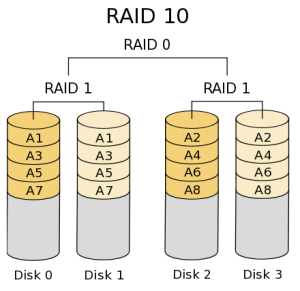
In the illustration, each sub-array is a RAID 1 mirror, and data is striped across the sub-arrays. The array survives one failed drive per mirrored pair, and rebuilds are gentle: the replacement drive is simply copied from its mirror partner, with no parity math.
The cost is capacity. Like RAID 1, usable space is 50%: four 1 TB drives yield 2 TB. For databases, virtualization, and anything with heavy mixed reads and writes, that trade is almost always worth it.
Hardware RAID vs Software RAID
A hardware RAID controller is a dedicated card that manages the array itself, taking the work off your CPU. With a battery backup unit (BBU), it can also cache writes safely, which helps a lot under heavy sustained write loads.
Software RAID (mdraid on Linux, or ZFS if you want checksumming and snapshots too) costs nothing, is easy to monitor, and has no controller to depend on. On modern CPUs its overhead is small for RAID 0, 1, and 10; parity levels cost a bit more.
For most workloads, software RAID is perfectly fine. Choose a hardware controller with a BBU when you run write-heavy databases or need write-back caching you can trust through a power event.
At Maple-Hosting, both are first-class: we configure hardware RAID (0/1/5/10, optional BBU) before delivery, or provision the drives raw so ZFS or mdraid can own them end to end. Every server configures up to 8 drive bays at checkout, mixing SSD, high-capacity SATA, and NVMe, and custom storage builds go up to 36 drives.
Which RAID Should I Pick?
- Two drives, important data: RAID 1. Simple, robust, done.
- Database, store, SaaS, or any busy production server: RAID 10. The write speed and painless rebuilds pay for the lost capacity.
- Large read-mostly archive on a tight budget: RAID 5, ideally on smaller drives, with the rebuild risk understood and real backups in place.
- Scratch space for reproducible data: RAID 0, and nothing you cannot afford to lose.
- Storage-first server (backup target, media library, file distribution): start from your capacity and growth needs; our storage dedicated servers page covers drive layouts, RAID choices, and bandwidth economics in depth.
RAID FAQ
Is RAID a backup?
No. RAID protects you from drive failure, not from deletion, corruption, ransomware, or mistakes, all of which are written to every drive in the array. Pair RAID with backups stored somewhere else.
Does RAID 1 need an even number of drives?
No. Two-drive mirrors are the common case, but a mirror can have three or more members, each holding a full copy. Three-way mirrors are used when the data matters more than the capacity.
How many drives can fail without losing data?
RAID 0: none. RAID 1: all but one drive in the mirror. RAID 5: exactly one. RAID 10: one per mirrored pair, so a 4-drive array can survive two failures if they land in different pairs.
Can I mix drive types in one server?
Yes, across arrays: a common layout is a fast NVMe or SSD mirror for the system and database plus a big SATA array for bulk data. Mixing very different drives inside a single array drags everything down to the slowest member, so keep each array uniform.
Get a Server with the Right RAID, Built In
Every Maple-Hosting dedicated server is configured to order in our Netherlands data center: your drives, your RAID level, hardware or software, with an optional BBU, assembled and tested before delivery.
Not sure which RAID level fits your workload? Talk to our team and we will recommend a layout based on what you are actually running. Our clients have been reviewing that help since 2008.