

Wondering what a bare metal server is, how it differs from a virtual machine, and why the hosting industry uses the term interchangeably with “dedicated server”? You’ve come to the right place. This is the plain-language version.
What is a bare metal server?
A bare metal server is a physical server dedicated to a single user (tenant), with all of the server’s resources available directly to that tenant and shared with no one else.
“Bare metal” means your operating system runs directly on the physical hardware, the metal, with nothing in between. There is no virtualization layer, no hypervisor, and no other tenants. When you install Linux or Windows on a bare metal server, that OS owns the CPU, RAM, drives, and network card outright.
The contrast is a virtual machine (VM), where your OS runs inside a software container on someone else’s physical server, next to other tenants’ VMs, with a hypervisor dividing the hardware among everyone.
Bare metal server vs dedicated server: what’s the difference?
In practice, almost none. Both terms describe a physical machine rented to one tenant. The distinction, where people bother to make one, is about what runs on it:
A bare metal server, strictly speaking, is not running a hypervisor: the OS sits directly on the hardware. A dedicated server is the same machine, but nothing stops you from installing a hypervisor on it and slicing it into VMs yourself.
Same hardware, same tenancy, different software choice. Hosting providers (including us) use the two terms for the same product, and you decide what runs on it.
Bare metal vs hypervisor
A hypervisor is software that creates and runs virtual machines. It comes in two types: Type 1 (a “bare metal hypervisor” like ESXi, Hyper-V, KVM, or Proxmox) installs directly on the hardware as its own minimal operating system; Type 2 (like VirtualBox) runs on top of an existing OS.
Install a Type 1 hypervisor on a dedicated server and you can carve it into as many VMs as the hardware supports, each with its own OS, allocated cores, and RAM. That is exactly how VPS providers build their products: a VPS is a slice of someone’s dedicated server.
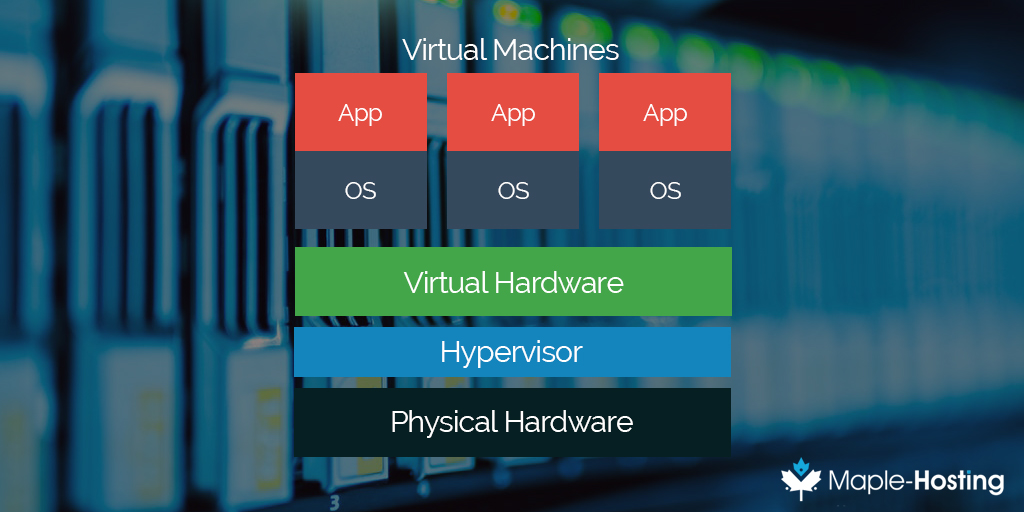
Type 1 Hypervisor Diagram
Skip the hypervisor, and the OS runs natively with zero virtualization overhead. That’s bare metal. For a deeper look at choosing a hypervisor, see our guide to bare metal hypervisors and which to choose.
Bare metal server vs virtual machine
Why pick the physical machine over a VM? Three honest reasons:
- Consistent performance. On a VM, a noisy neighbor on the same host can eat into disk and network performance at the worst moment. On bare metal there are no neighbors: benchmarks today look like benchmarks next month.
- Direct hardware access. Databases, streaming engines, game servers, and I/O-heavy workloads benefit from talking to real NVMe drives and a real network card instead of virtualized ones.
- Full control. Your kernel, your tuning, your security hardening, your choice to virtualize or not. Nothing is reserved for a hypervisor you don’t control.
A VM still makes sense for small or spiky workloads. Bare metal wins when performance, predictability, or data isolation are the point.
Why would I need a bare metal server?
This is really the question of when to upgrade to a dedicated server. If your workload has outgrown shared resources, if traffic spikes hurt, if you need every bit of I/O you paid for, or if compliance demands single tenancy, it’s time.
Here are the benefits in short:
- Exclusivity. RAM, storage, CPU, and bandwidth are dedicated to you and you only.
- Root access. Install your own software, configure your own stack, read your own logs.
- Security. Single tenancy removes an entire class of shared-infrastructure risk, and you harden the box your way.
- Performance. No virtualization overhead and no neighbors translates to the most consistent performance per dollar.
- Reliability. Traffic surges are handled by hardware that answers to nobody else.
Bare metal FAQ
Is a bare metal server the same as a dedicated server?
For buying purposes, yes: one physical machine, one tenant. “Bare metal” additionally implies you run your OS directly on the hardware instead of virtualizing it.
Can I run a hypervisor on my bare metal server?
Yes. It’s your hardware; installing ESXi, Proxmox, or KVM and building your own VMs is a common and fully supported use. At that point, purists would say it’s a dedicated server acting as a virtualization host, and your VMs’ performance is still backed by hardware nobody else touches.
Is bare metal faster than a VM with the same specs?
For the same nominal specs, bare metal avoids the hypervisor’s overhead and, more importantly, eliminates contention from other tenants. The difference shows most in storage I/O, network throughput, and latency consistency.
What does a bare metal server cost compared to cloud VMs?
For sustained workloads, a dedicated machine usually delivers far more real capacity per dollar than equivalent cloud instances, especially once bandwidth is priced in. For bandwidth-heavy workloads, compare egress costs before anything else.
Getting a bare metal server
Every Maple-Hosting server is exactly this: a physical, single-tenant machine in our Netherlands data center, configured to order and yours down to the metal. Choose Netherlands dedicated servers for general workloads or unmetered dedicated servers for bandwidth-heavy ones, and if you’re not sure how to spec it, our guide to choosing server specifications will get you there.
Maple-Hosting is a privately owned hosting company that has been offering Netherlands dedicated servers to partners around the world since June 2008. We focus on providing a perfect hosting experience that allows our customers to focus on their businesses.